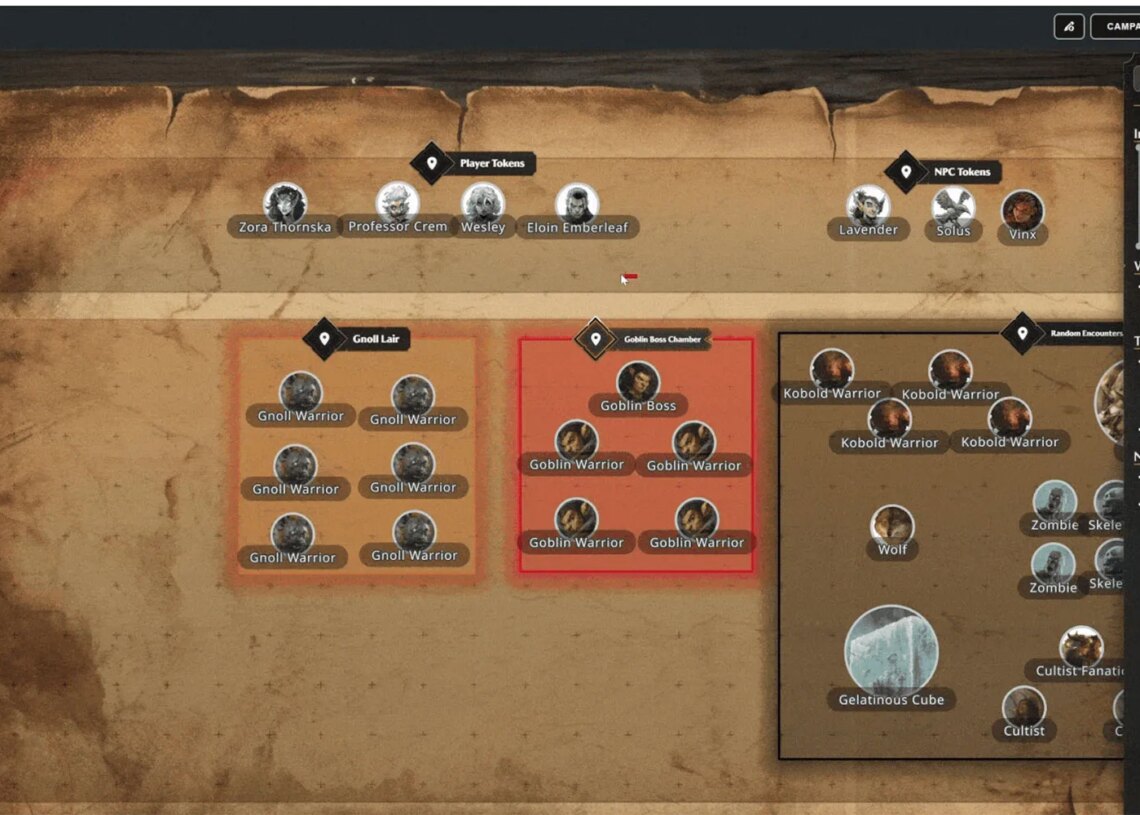
D&D Beyond is rolling out yet another major new feature with the addition of Scene Prep and Theater of the Mind organization tools for Dungeons and Dragons DMs.
D&D Beyond Drops A Game-Changing Update for DMs
D&D Beyond has been working hard this year to improve its reputation with the community by focusing on transparency, an open-feedback loop, and much more frequent and agile updates.
So far, the strategy seems to be paying off. The Dungeons and Dragons VTT has seen some major upgrades since 2026 arrived and today delivers some new tools that have been frequently requested since the Maps tool originally launched.
The Scene Prep update is all about giving DMs a space to prep for their session right where they will actually be playing the session, rather than in a separate notebook or journal. Dungeons Masters will be able to drop scene pins on the map, jump straight to the notes for that moment, and stop hunting through tabs and scrolling through documents mid-session.
All of that said, Scene Prep was also designed to be useful for groups that don’t use Maps for every encounter, as well. The new “Theater of the Mind Organizer” map, available for free in the Basic Maps section to all users, lets DMs stay organized for Theater of the Mind encounters, and even at your in-person table.
To help DMs experiment with the new tool and wrap their heads around what is possible, five weekly Drop-in Encounters from D&D Beyond Drops have been updated to include built-in Scene Prep material. That means DMs can now find plot hooks, read-aloud text, and reasons the encounter is happening.
For DMs who want to jump right in, here is how to use Scene Prep:
- Open the Panel – From D&D Beyond’s Maps VTT, click the new Scene Prep icon (P) to open the panel on the right.
- The panel starts by showing the prep for the Location you have loaded, whether that’s a map or our Theater of the Mind organizer, and you’ll see every note written for what might go down there. On the map itself, you’ll see the scene pins. They’re visible only to the DM, and each one represents a different scene that could happen in that area. Click a pin to jump to its prep.
- Create a Scene – Open the triple-dot menu in the panel and choose Add a Scene.
- When you create a new scene (or open a location you haven’t written any prep for yet), Scene Prep gives you a starting framework, built with input from game designers, veteran DMs, and novice DMs. It’s there to help you think through the kind of information you want ready to hand. It’s also entirely optional, and easy to replace with your own format.
- Write Your Prep – Click Edit and start writing. You can apply different headers and experiment with whatever formatting works for you, and everything saves as you type, so there’s nothing to lose if you close the tab.
- Place and Hide Scene Pins – Once you’ve created a scene, place its pin on the map and drag it wherever it belongs.
- If you have a lot of scenes, a map can start to get busy fast. Click the pin visibility icon (L) to hide most of them. They stay slightly visible on purpose, so you still get the reminder that your players are about to walk into a new scene. But in transparency mode, you can see and interact with the rest of the map much more easily.
- Rename Maps and Sort the Dropdown – Two smaller additions: while you’re in Edit mode for the top-level Location prep, editing the name of that location also edits the map name in the Map Selector dropdown, which now sorts alphabetically. Together they make a long list of maps much easier to organize and navigate.
That should be just about everything players and DMs need to understand to get started with these new tools. Be sure to check back soon for lots more Dungeons and Dragons news and updates.
Dungeons and Dragons is available now at local game shops and digitally through D&D Beyond, Roll20, and other similar services.
The post Dungeons and Dragons – Huge D&D Beyond Update Adds DM Scene Prep and Theater of the Mind Support appeared first on VICE.