What do you want for dinner tonight?
With so many sites devoted to cooking these days, it’s easy to find recipes for any dietary option. Some foodie apps are even using artificial intelligence for tasks like taking a food inventory and making meal suggestions.
But even if you prefer to stick with paper cookbooks, your phone can be useful — from finding you a recipe to helping you prepare the dish. Here are a few tips.
Scanning Recipes
People have been writing down recipes for thousands of years — think clay tablets and cuneiform writing long before “The Joy of Cooking” hit the shelf.
If you have old family recipes scribbled on index cards, you can make your own digitized recipe database and store it on your phone. The same goes for a recipe in a magazine or in a beloved crusty cookbook; just use your phone’s camera to scan and save it.
On an iPhone, you can create PDF files with either the Preview or the Notes app:
-
In Preview, tap “Scan Documents” on the main screen. The scans land in your Files app for sorting.
-
In Notes, create a new note, tap the paper clip icon in the toolbar and choose “Scan Documents.” You can make folders in Notes to group your recipes.
Additionally, Notes has a “Scan Text” option in the menu, which captures chunks of editable text into an open note as you move the camera over the page. Tap “Insert” to add a batch of the text. (Check it and correct it for typos, especially when scanning from old printed sources.) You can later copy and paste the ingredients list into a Notes checklist for shopping.
The Google Drive app for Android and iOS includes a scanning tool. Open the app, tap the + icon and then “Scan,” and point the camera at the recipe you want to capture.
Samsung Galaxy users can tap the “Scan” button in the camera app to capture a document; its text can be imported onto a Note from the phone’s Gallery app.
Kitchen Aides
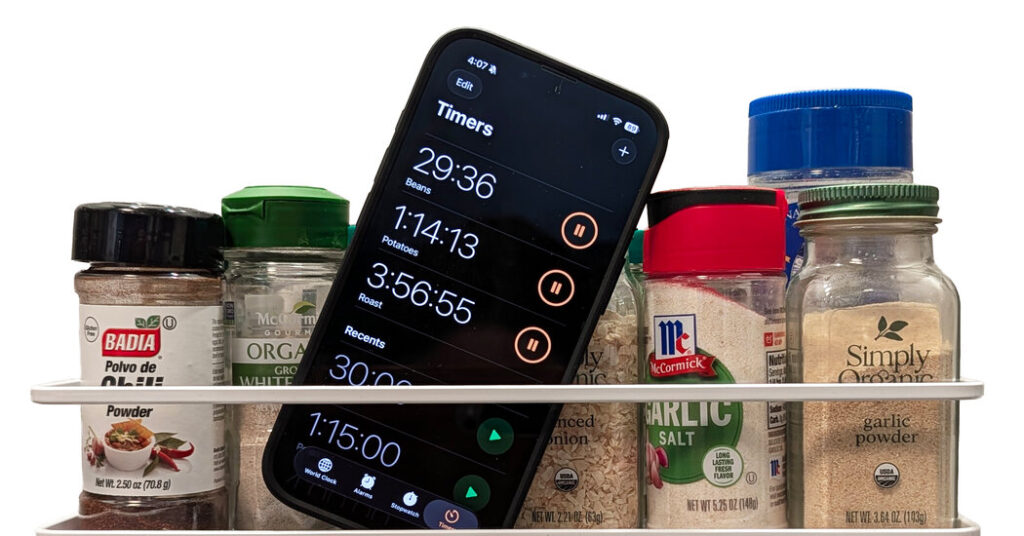
Once you’re in the food-preparation stage, other free apps can help. Most built-in clock apps now handle multiple timers, which is helpful if you’re making the main course and the side dishes simultaneously and everything needs a different cooking time.
To manually set up multiple timers in iOS 17 and later, open the Clock app and tap the Timer tab. Set the amount of time you want for the first timer and, if you want to, give it a name like “Roast.” Tap the Start button to begin the countdown. To add another timer, tap the + button in the upper-right corner and repeat the process.
The steps are similar for Android’s Clock app. Samsung’s Clock app for its Galaxy phones has its own Timer tab and + button to add multiple timers: Tap the adjacent “List” icon to display them all at once.
For a hands-free approach, you can command the phone’s virtual assistant to set timers as you need them. “Hey, Siri, set a timer for 25 minutes,” for example.
Smartphone virtual assistants are steadily becoming more entwined with A.I. software. As a result, with Apple’s Siri with Apple Intelligence, Google’s Gemini or Samsung’s Bixby teamed with Galaxy AI, you can get more detailed answers to requests — like recipe suggestions based on desired ingredients.
The phone’s virtual assistant can also provide other quick answers, like converting measurements: “Please convert 265 milliliters to U.S. cups.”
Advanced Apps
If you prefer one-stop shopping with a ready selection of recipes and instructions on how to make them, consider one of the comprehensive meal-making apps available. These include BigOven, Tasty, NYT Cooking (a product of The New York Times) and many more.
Most apps provide basic content, but signing up for a subscription adds the full recipe library and other features, like personalized menu suggestions, the ability to save recipes and no advertisements.
Samsung has its own A.I.-enhanced Samsung Food app — formerly known as Whisk — for Android and iOS. A premium version called Samsung Food+, with perks like personalized meal plans and nutrition tracking, is $60 a year. (Owners of new Samsung devices can often get a free subscription.) The app meshes with Samsung’s line of smart-kitchen appliances as well.
Samsung Food can identify ingredients in the refrigerator (as can Galaxy smartphones equipped with Galaxy AI) with the phone’s camera and then suggest recipes using them. This allows you to save money and cut down on food waste.
Using A.I. to match your existing ingredients to recipe suggestions is a popular concept, as demonstrated by the emergence of Fridge AI, FridgeVision AI, PhotoFridge and similar apps. But as with anything suggested by A.I., be sure to double-check those recipes and ingredients before you really get cooking.
J.D. Biersdorfer has been writing about consumer technology for The Times since 1998. She also creates the weekly interactive literary quiz for the Book Review and occasionally contributes reviews.
The post Spice Up Your Cooking Skills With Help From Your Phone appeared first on New York Times.