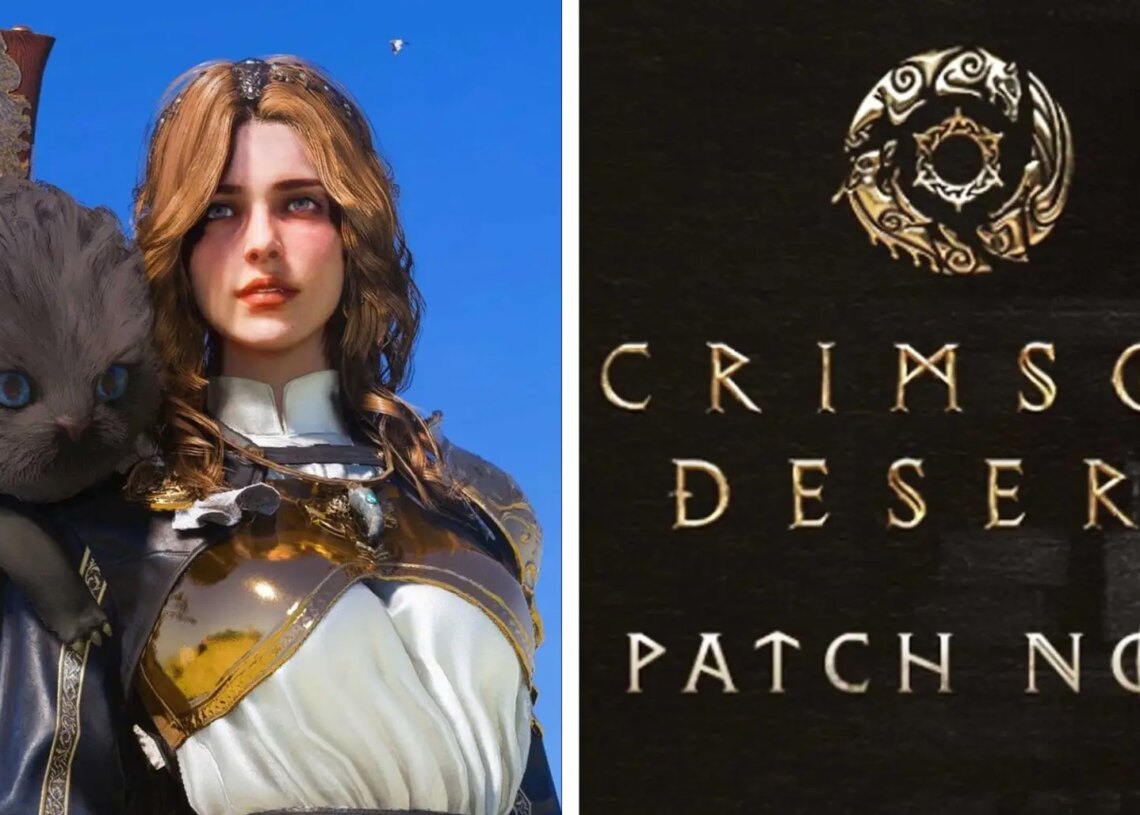
The Crimson Desert update 1.05.00 is now live, and adds more major features to the action adventure title. From new Legendary pets, to a boss mode, here is everything included in the latest Crimson Desert Patch Notes.
Crimson Desert Update 1.05.00 Patch Notes Explained
The latest Crimson Desert update 1.05.00 has now rolled out to PC and console users, and it’s massive. One of the biggest new features are the Rematch and Re-Blockade mode. In Rematch, players can fight against any boss fight they have previously completed. Re-Blockade, on the other hand, is a new feature that has enemy factions taking over territories on the map.
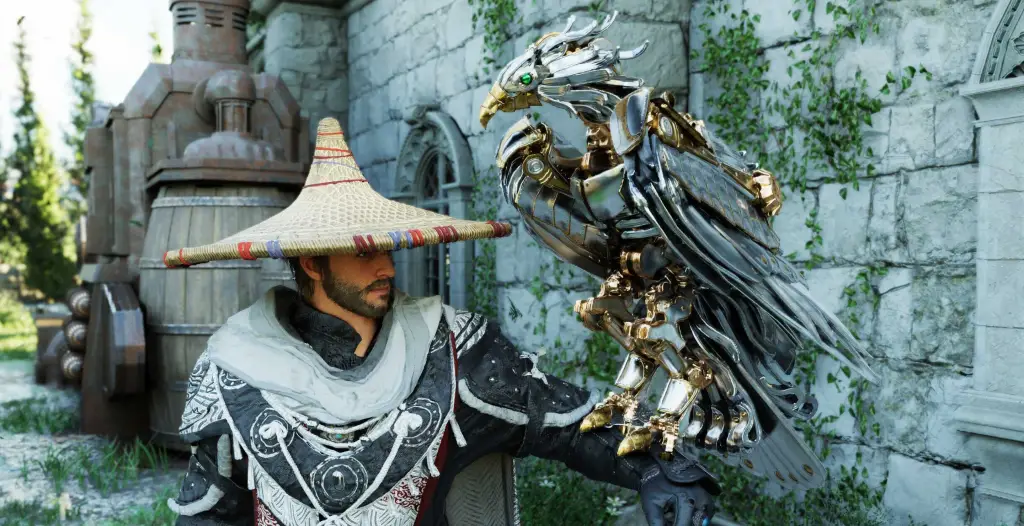
Don’t worry, the Crimson Desert Re-Blockade feature has an option toggle button in the menu. So you can keep the feature completely off, or decide how frequently you want enemies to take over strongholds. Finally, the Crimson Desert patch also adds a handful of new Legendary pets that you can now tame and make your allies. The Iron Eagle looks the coolest, as it’s literally a mechanical robot eagle that looks badass.
For your convenience, here are the full Crimson Desert patch notes for update 1.05.00 below:
Crimson Desert Patch Notes (Update 1.05.00)
Crimson Desert Re-Match Mode Explained (How to Fight Bosses Again)
- Added the Rematch content. (This content will be continuously improved through future patches.)
- The powerful bosses you faced throughout Crimson Desert await your challenge once again. You can now rematch any boss at any time to test your progress and experiment with different tactics to perfect your own combat style.
- By lighting up your lantern at the site of a previous boss encounter, you can read the Memory Fragment to initiate a rematch.
- Memory Fragments become active after a boss is defeated.
- You can locate the Memory Fragments for rematches on both the World Map and minimap.
- Select “Open Map” from the Knowledge > Memory Fragments > Bosses tab to see exactly where you previously fought a boss.
- By lighting up your lantern at the site of a previous boss encounter, you can read the Memory Fragment to initiate a rematch.
- You can attempt a rematch with any character (Kliff, Oongka, Damiane).
- The Rematch will initially feature two modes and you will be able to have a rematch with 69 bosses starting from this week.
- Reminisce
- Fight the boss exactly as they were when you first encountered them.
- Resonate
- The boss’s stats will scale to match the player’s progression. This only applies if the player’s stats are higher than the original boss’s stats.
- Reminisce
- In Rematch, any consumables used will be restored to their prior state once the battle ends, and no separate loot can be obtained. Please note that this may be changed through future updates.
- The powerful bosses you faced throughout Crimson Desert await your challenge once again. You can now rematch any boss at any time to test your progress and experiment with different tactics to perfect your own combat style.
Crimson Desert Re-Blockade Mode Explained (New Territory System)
- Added the Re-blockade content. (This content will be continuously improved through future patches.)
- Re-blockades will occur at a set probability for strongholds that meet specific time and condition requirements.
- Re-blockades are applied after a loading screen occurs, such as after saving and loading, or sleeping in a bed.
- The Re-blockade offers three modes to adjust its frequency. You can change this via the Re-blockade Frequency option under Settings > Gameplay. (If the Re-blockade Frequency is changed, the new frequency will be applied to the game after all the previously planned Reblockades are initiated.)
- Re-blockade Frequency: Stable
- Re-blockades will not occur.
- Re-blockade Frequency: Conflict (default setting) (Edited: 2026/05/02)
- Re-blockades will occur intermittently.
- Re-blockade Frequency: War
- Re-blockades will occur frequently.
- Re-blockade Frequency: Stable
- During the Re-blockade, 13 different factions will carry out re-blockades across 23 forts and quarries.
- We plan to gradually increase the number of participating factions and targeted strongholds in the near future.
- We also plan to adjust the enemies appearing during re-blockades to pose a much greater threat.
- We also plan to improve the overall system of Liberation and Re-blockade.
All New Legendary Pets in Crimson Desert Update 1.05.00
Added new legendary animals that can be kept as pets: Iron Eagle and Hyacinth Macaw.
- The Iron Eagle appears upon meeting certain conditions.
- Added a new creature: Mountain God Boar.
- The Mountain God Boar appears upon meeting certain conditions.
- Added a shop that sells disguise items.
Shops
- Added new items to shops. (To prevent spoilers, details are listed in the dropdown menu below.)
- When wearing the Ring of Lightning after defeating the Titan, you can purchase the Lightning Bolt Plate Boots from Bari’s shop.
- Improved interaction with gold bars placed throughout the world that were previously unobtainable. Picking them up now yields a Crude Gold Bar worth 5 Silver.
- Added a new location to obtain the Pumpkin Head near pumpkin patches.
- Added Carry, Lower, and Pet interactions for goose and duck pets.
- Fixed an issue where housing items automatically retrieved due to Camp Expansion were not displayed in the housing installables UI.
- Improved crop harvesting in the garden so that you consistently receive a minimum of 2 crops regardless of fertilizer or water supply.
- Improved the visibility of hints in certain puzzles.
- Improved the ruins puzzle at the lake near Kharonso so that progress is maintained even after saving and loading or leaving the area.
- Improved Mission Dispatch to automatically cancel if missions can no longer be sustained.
- Improved Embed Abyss Gear and Create Socket functions to support locked items.
- Improved the highlight effect when dyeing outfits to make the dyeable parts clearer.
- Moved the Abyss Nexus near Zargan Tankworks, where the Research Institute is located, to the top of the cliff. (If you have already activated the Abyss Nexus, it will remain activated after relocation.)
- Improved the graphics quality of certain animals.
- Fixed an issue where a comrade’s Trust would reset to 10 under certain conditions.
- Fixed an issue where certain livestock could not be sold or butchered.
- Fixed an issue where a comrade’s status would display as “In Progress” even when they were not on a mission.
- Fixed an issue where certain knowledge could not be acquired.
- Fixed several issues regarding specific bosses. (To prevent spoilers, details are listed in the dropdown menu below.)
- Fixed an issue where Kliff could not customize/dye after defeating Umbra.
- Fixed an issue where the text would not display properly when reading the Aeserion Gear Blueprint.
- Fixed revolving doors in certain puzzles reacting to Force Palm.
- Fixed an issue where the Tesla Coil item would get stuck in the air under certain conditions.
- Fixed an issue in the Home Decoration mode where moving an object placed on top would also move the object underneath it.
- Fixed an issue where the drill and chainsaw items could not be equipped in safe zones.
- Fixed an issue where legendary mounts would die immediately upon being summoned under certain conditions.
Combat and Action
- Applied bug fixes and improvements regarding specific bosses. (To prevent spoilers, details are listed in the dropdown menu below.)
- Fixed an issue with Corrupted Caliburn displaying abnormal attack patterns occasionally during combat.
- Improved combo fluidity when attacking the Storm Crusher and Thunder Tank bosses.
- Fixed an issue where the Abyss Nexus would reset upon saving and loading after defeating Abyss Kutum.
- A warning message will now display if you move out of the combat area during the fight against Ludvig.
- Fixed an issue where bosses would occasionally not enter a staggered state.
- Fixed an issue where certain bosses would not take damage from bows and ranged attacks while staggered.
- Fixed an issue where bosses would endlessly repeat evade animations under certain conditions.
- Increased the damage reduction rate applied upon a successful guard for all weapon types.
- Reduced the character’s travel distance when using the Force Current skill.
- Fixed an issue where repeatedly pressing the input for “Escape” would not free the character from immobility when afflicted with the Freeze status effect.
- Fixed an issue where comboing into the Evasive Shot skill while casting Charged Shot did not work properly.
- Fixed an issue where Focused Charged Shot could be used even if the skill hadn’t been learned.
- Fixed an issue where Axiom Force would not activate properly when aiming while the character is falling.
- Fixed an issue where using Healing Force Palm on specific objects would cause the Daze status effect to the player.
- Fixed an issue where monsters near the Spire of Frost would take cold damage.
- Fixed an issue where the character would not perform a falling animation when jumping from high places under certain conditions.
- Fixed an issue where the weapon looked unnatural when using the Weapon Throw skill under certain conditions.
More Fixes
- Fixed an issue where certain attacks from Walker monsters dealt excessive damage.
- Fixed an issue where the Visione was worn while holding a weapon under certain conditions.
- Fixed an issue where the weapon’s appearance wouldn’t return if the character was swapped after a Weapon Throw.
- Fixed an issue where the weapon would occasionally bounce in midair when the Crow’s Pursuit Abyss Gear was equipped.
- Fixed an issue where stamina wasn’t consumed during flight under certain conditions.
- Improved the appearance of hostile Marni’s mech monsters.
- Fixed an issue where destructible objects occasionally didn’t break when hit by projectiles at a distance.
- Fixed an issue where the character would bounce unnaturally when falling into a shallow river.
- Improved interactions on certain merchant NPCs to include Tackle and Carry.
- [Damiane] Fixed an issue where enemies right next to the character would not take damage when using Piercing Light with a greatsword.
- [Damiane/Oongka] Fixed an issue where the character would automatically recover upon receiving fatal damage.
Controls
- Fixed an issue where controller and keyboard/mouse control presets would reset.
- Fixed an issue where the Vault skill did not trigger consistently.
- Pressing the Jump key once during an attack will execute a standard Vault.
- Pressing the Jump key again during its activation will execute a Double Jump, leaping off the enemy.
- Separated the interaction keys for Sit and Lean on terrain and objects.
- Fixed an issue where the 3rd hit of Force Palm would occasionally activate without additional key input after the 2nd hit.
- [Damiane/Oongka] Improved control responsiveness after using the Throw skill.
- Fixed an issue where some key inputs were delayed during cutscenes.
- [Keyboard/Mouse] Fixed an issue where changing quick slot tabs didn’t work near interactable targets.
- Fixed an issue in certain water terrains where repeatedly starting/stopping swimming would lock the player’s controls.
- Fixed an issue where certain controls were disabled at the start of an Unarmed Duel.
UI Fixes & Improvements
- Fixed an issue where the displayed chapter name during an autosave or manual save did not match the actual ongoing chapter.
- Please accept our sincere apologies, and note that save files displaying an incorrect chapter name will only be updated to the correct chapter name after being manually saved again.
- Improved the Skills menu to directly open the skills screen for the character currently being played.
- Improved the UI on the Abyss map to intuitively display teleport paths.
- If a specific object is discovered and registered in Journal – Notifications, you can now select that notification to check its location on the map.
- Improved the minimap to display owned pets when in the Greymane Camp.
- Improved Sell and Gift lists to grey out locked items.
- Added the Cancel key guide to appear during Eavesdrop.
- Improved the Save menu to display the autosave slot.
- Added a feature to delete saved data from the Load menu.
- This feature cannot be used when the Load menu is accessed from the Main Menu.
- Fixed an issue where the owned quantity of an item displayed in the bottom right of the inventory was abnormal.
- Fixed an issue where the displayed owned currency differed from the actual amount when loading a save.
- [Keyboard/Mouse] Fixed an issue where the key guides during Home Decoration looked unnatural.
- [Keyboard/Mouse] Improved mouse selection for inventory category tabs.
- Fixed an issue where the Quick Menu list remained open if playing a Memory Fragment failed.
- Fixed an issue where other tabs could not be selected after scrolling down in Map Details.
- Fixed an issue where the Preview All feature was unusable in the Pets – Tailor’s Shop menu.
- Fixed an issue where the Stormtalon Ridge Watchtower still showed as blockaded on the map even after being liberated.
Graphics & Settings
- [PC] With the implementation of NVIDIA Streamline SDK 2.11.1, the “Dynamic Multi-Frame Generation” option has been added under Settings > Video. (GeForce RTX 50 Series exclusive)
- [Playstation 5 Base / Xbox Series S,X] Added the “Sharpness Enhancement” option under Settings > Video.
- [Mac] Fixed rendering errors occurring in certain scenes, including water graphics.
- Improved rain falling from eaves to look more natural.
- Fixed an issue where the appearance of the bow and quiver looked unnatural under certain conditions.
- Improved guides displayed in fullscreen so they can reviewed in Menu > Journal > Notifications.
How to Get the Crimson Desert Hyacinth Macaw (Legendary Pet Guide)
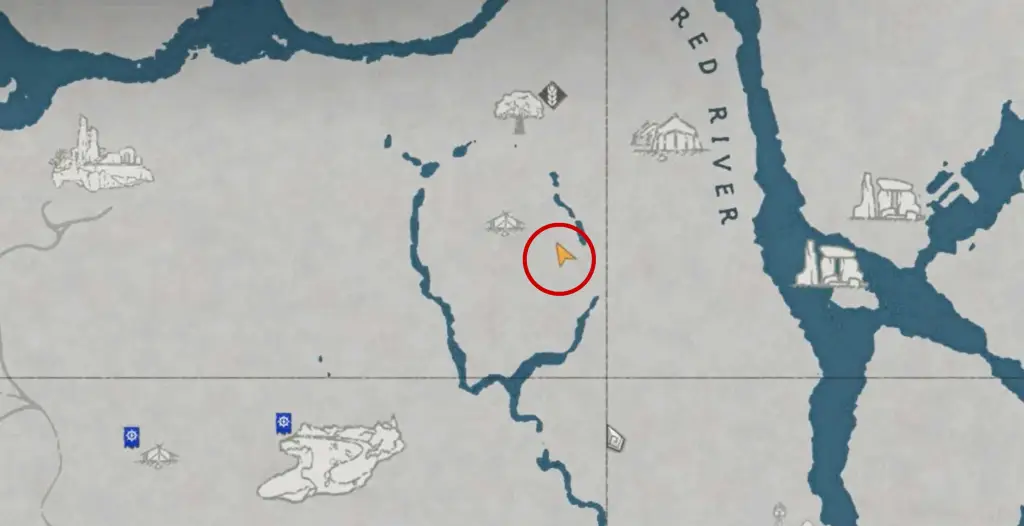
One of the rare Legendary pets added in update 1.05.00 is the Crimson Desert Hyacinth Macaw. However, some players have had trouble finding it due to a glitch with the Iron Eagle. Make sure you get the Macaw first before unlocking the Eagle. Here are the quick steps on how to get the Hyacinth Macaw:
- Step 1: Travel to the location (in the map above) east of the Red River.
- Step 2: Place the Sotdae of Bonde bird feeder on the side of the mountain.
- Step 3: Place 8 Desert Melons on the bird feeder.
- Step 4: The Hyacinth Macaw will then appear and start eating the melons. Wait a few minutes while its Trust meter goes up.
- Step 5: You can now pet and then take the Hyacinth Macaw with you.
One important step is to NOT tame the Iron Eagle before taming the Hyacinth Macaw. Players have reported a bug which is blocking the Crimson Desert Hyacinth Macaw Legendary bird from appearing. So if you want both Legendary’s, I would get Hyacinth first and then go for Iron Eagle last.
The post Crimson Desert Update 1.05.00 Adds Legendary Pets, Boss Rematch Mode (Full Patch Notes) appeared first on VICE.