
Eager to get away from Google’s, Microsoft’s, and Apple’s corporate dominance? Maybe you’ve just got (well-justified) trust issues. Or perhaps you want to throw your support behind the little guys. It won’t swing the whole market in their favor, but that’s one more user on their side and one less on the big guys’.
The Mozilla Foundation is the nonprofit organization that runs, among other apps, the Firefox browser. Firefox has been around for 21 years, and it generally works with everything out there on the web. But there’s a curious issue when you try to use Google Workspace (which includes Google Docs, Spreadsheets, and more), in which keyboard shortcuts—namely copy, cut, and paste—don’t work when you’re on Firefox.
There’s an easy fix for that.
why it’s busted, and how to fix it
The problem is that on the desktop versions of the browser for macOS, Windows, and Linux, Firefox runs on Mozilla’s own Gecko engine. In contrast, almost every other popular browser on the market uses a version of the open-source Chromium engine.
Google Chrome, of course. So do Microsoft Edge, Brave, and Opera. All Chromium-based. Apple’s Safari uses its own engine, and the Mullvad browser bases itself on Firefox, but other than that, the market is solidly Chromium-dominated.
No surprise that Google’s extraordinarily popular Google Workspace is going to work well on Chrome and other Chromium browsers. Google wouldn’t let it stand if its own suite of productivity apps didn’t work with its own browser.
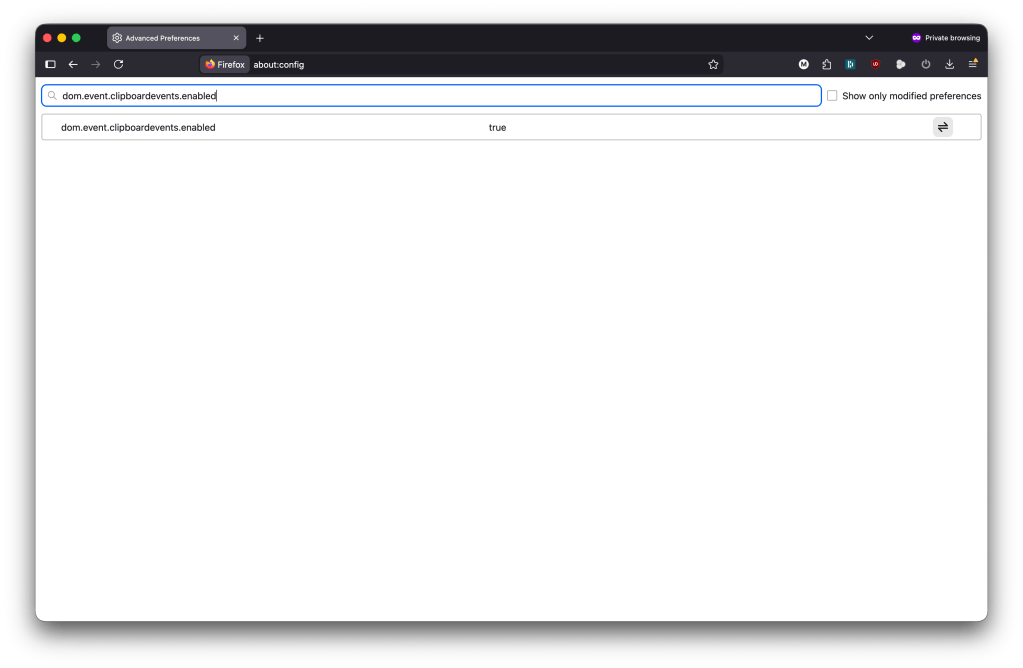
Rather than give up on Firefox or toggle between it and another browser every time you have to use Google Workspace, open a fresh tab in Firefox. Type “about:config” into the URL bar. It’ll show you a warning; click through it. You’ll be fine. Now, into the bar on the page that appears, type dom.event.clipboardevents.enabled
It’ll pop up, as in the image above, and in the center column, it’ll likely say “false.” See that button to the right of it under “Show only modified preferences?” Click that. It’ll toggle “false” to “true.”
Now you’re all set. Close the tab, navigate to Google Docs, and give it a try. It should be working now. If it doesn’t, your ad blocker or one of your extensions may be interfering with your Firefox. Give Mozilla’s troubleshooter a try.
The post Broken Copy/Paste in Google Docs on Firefox? Here’s an Easy Fix. appeared first on VICE.