Overwatch 2 is starting to make some reveals for upcoming changes and content ahead of the Season 20 launch on December 9, 2025. One such change that has been touched on prior to this update is some new developments with the aim assist function for players on console/controller.
Overall, Overwatch 2 plans to bump up the strength of aim assist and even offers additional pointers for tweaking aim assist settings to your play style, as indicated in the latest official blog post. In fact, it seems that with Season 20, the devs have taken some extra time and care for the consideration of console players and their experience with the game.
Overwatch 2’s New Aim Assist Features, Explained
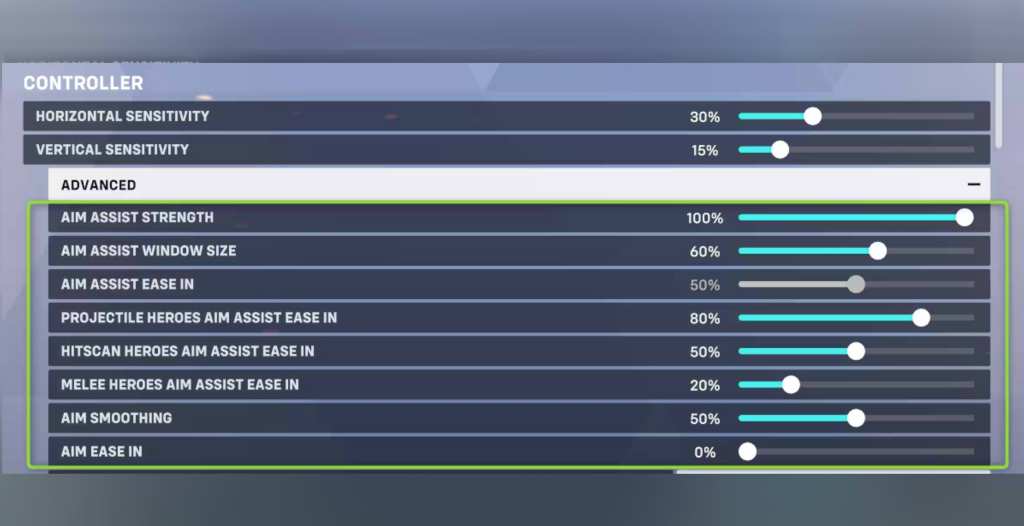
The most significant aim assist change coming in Overwatch 2’s Season 20 is an overall 6-8% base aim assist increase, depending on the distance to your target. In addition to this, Supports will have access to a new Aim Assist Health Threshold setting, enabling dedicated team healers to shift their focus to priority critical targets with ease. Illari and Juno will also be gaining 100% aim assist by default, to help with their more aim-reliant weapons.
How Does Aim Assist Work in Overwatch 2?
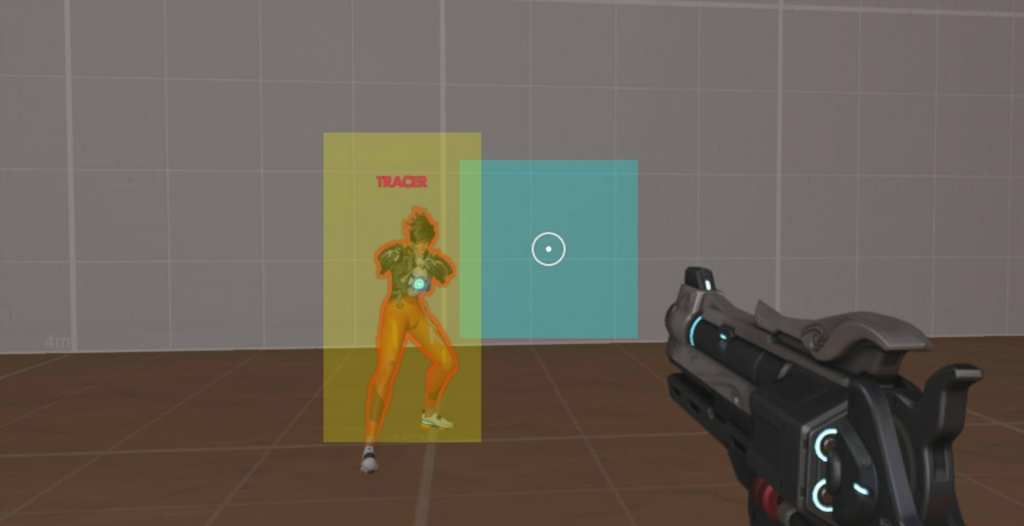
In Overwatch 2, aim assist helps correct a player’s aim within their ‘aim window’, as seen in blue in the screenshot above, to the ‘character window’, as seen in yellow above. This area is referred to as the ‘aim assist bubble’ and can be dialed up to strengthen the aim assist effects, depending on your personal preferences.
If you’re looking to get into competitive play and climb the Overwatch 2 ranks, Blizzard has also included some helpful details below. This information covers what each changeable setting is and how it works.
Overwatch 2 Aim Assist Settings
- Aim Assist Strength: Changes the strength at which the game assists your aim towards the target, adding friction to the amount of slow when hovering over a target’s window. This also includes rotational aim assist.
- Aim Assist Window Size: Scales the size of the player window, which is used to track a target’s windows. Larger windows equal a higher assist. In Season 20, this will default at 60% instead of 100%.
- Aim Assist Ease In: Adjusts the amount of ease-in when the edges of the player window and the enemy window first intersect. At 100, you’d get the least amount of aim assist strength and with 0, you’d get full aim assist strength.
- This setting will be split into three individual Hero style sliders (Projectile, Hitscan, and Melee) in Season 20 so you can further customize aim assist strength to your liking. For example, melee tanks might want lower aim assist but a projectile hero may want to bump it all the way up.
- If you want to tune a specific Hero’s aim assist ease-in value separately from these options, you can still do so on that Hero’s options page.
- Aim Smoothing: Takes raw input from the controller and smooths it out. This tends to be better for higher sensitivities and longer distances to track targets, but can cause delay when going after closer targets.
- Aim Ease In: This one is for the true controller aficionados who want to change the shape of the sensitivity curve. If you don’t know what that is, don’t worry about this setting.
The post Blizzard Is Making Overwatch 2 Easier for Controller Players appeared first on VICE.